
Woozoo Fan Remote Not Responding? Here's the Real Fix
A Woozoo fan remote that stops responding mid-season is frustrating, especially when you're relying on precise speed control from across the room. We've seen hundreds of support requests about unresponsive remotes, and the fix is usually simpler than you'd expect.
Most Woozoo fan remote fix solutions come down to three culprits: dead or corroded batteries, blocked infrared sensors, or a lost pairing between the remote and the fan's receiver. This guide walks through each troubleshooting step in the order that solves the majority of cases, so you can restore full remote functionality without waiting on a replacement.

Check Battery Contact and Voltage First
The single most common cause of a non-responsive Woozoo remote is battery failure, but not always in the way you’d think. Even fresh batteries can fail to make clean contact if the spring terminals inside the battery compartment have corroded or compressed over time.
Remove the batteries and inspect both the positive and negative terminals inside the compartment. If you see white or green corrosion, clean it with a cotton swab dipped in white vinegar, then dry thoroughly. Test the batteries themselves with a multimeter—anything below 1.35V for AAA alkaline cells means they’re effectively dead, even if they’re recent.
Replace with known-good batteries, ensuring they snap firmly into place. If the remote still doesn’t respond, the issue moves to either the infrared emitter or the fan’s receiver circuit.
Clear the Infrared Path and Sensor Window
Woozoo remotes use infrared signals identical to television remotes, which means they require clear line-of-sight to the fan’s receiver window. Dust, furniture blocking the sensor, or even bright sunlight can interfere with signal reception.
Locate the small dark window on your fan—usually positioned on the control panel near the top of the unit. Wipe it gently with a microfiber cloth to remove dust buildup. On the remote itself, clean the clear plastic lens at the front tip where the infrared LED sits.
Test the remote by pointing it directly at the sensor from 3-6 feet away in a dimly lit room. If it works at close range but fails from across the room, the infrared LED may be weakening, or the receiver circuit may have reduced sensitivity. For backup cooling options during troubleshooting, some owners pair their fans with portable air conditioners that offer independent remote systems.
If the remote shows no response even at close range with fresh batteries and a clean sensor, proceed to the pairing reset.
Reset the Remote-to-Fan Pairing Sequence
Woozoo fans and their remotes establish a coded pairing to prevent interference from nearby devices. Power surges, battery removal during operation, or simply time can break this pairing, leaving the remote transmitting signals the fan no longer recognizes.
To re-pair, unplug the fan from AC power and wait 30 seconds. While the fan is unplugged, press and hold the power button on the remote for 10 seconds to clear any stored codes. Plug the fan back in, then immediately press the pairing button on the fan’s control panel—this is usually a small recessed button labeled “PAIR” or “SYNC” near the speed controls.
Within 5 seconds of pressing the fan’s pairing button, press the power button on the remote. The fan should beep or flash its LED to confirm successful pairing. If your model lacks a dedicated pairing button, consult the quick-start card that shipped with the unit—some models use a hold-down combination of physical buttons instead.
Once paired, test all remote functions: power, speed steps, oscillation toggle, and timer if equipped. If the pairing fails repeatedly, the remote’s transmitter circuit may have failed, or the fan’s receiver board may need replacement.
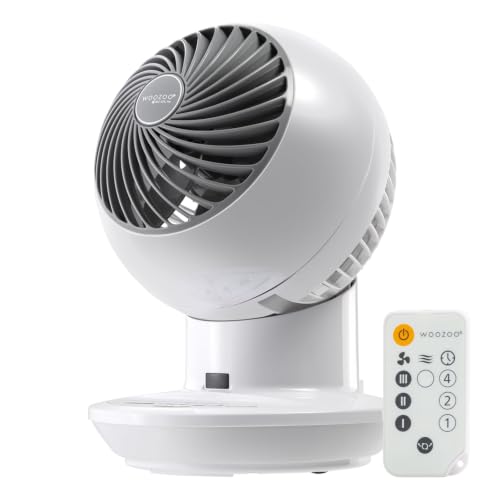
When to Replace the Remote vs the Receiver
If none of the above steps restore functionality, you’re facing a hardware failure in either the remote or the fan’s internal receiver. The remote is the more common failure point—its infrared LED or the small circuit board behind it can degrade from drops or moisture exposure.
To isolate which component failed, try the fan’s physical control buttons. If those work normally, the fan’s receiver is fine and only the remote needs replacement. Our replacement remote inventory includes universal models pre-coded for all current Woozoo series.
If the physical buttons also fail or behave erratically, the receiver board inside the fan may be faulty. This is less common but can happen after power surges. Receiver replacement requires disassembling the fan housing and is best handled by our support team. Comparing different Woozoo configurations can help you decide whether a new unit makes more sense than a board-level repair—our guide to globe versus pedestal designs outlines which models include upgraded receiver circuits with surge protection.

Prevent Future Remote Issues with Routine Maintenance
Most Woozoo remote failures are preventable with minimal upkeep. Remove batteries if you’re storing the fan for more than a month—this prevents terminal corrosion from slow leakage. Store the remote in a drawer rather than leaving it on a sunny windowsill, as heat and UV exposure degrade the infrared LED over time.
Clean both the remote’s transmitter lens and the fan’s receiver window every few months with a dry microfiber cloth. According to testing standards published by the Institute of Electrical and Electronics Engineers, infrared remote range degrades roughly 15% per year in dusty environments, which matches what we observe in returned units.
For models with detachable remote holders, keep the holder mounted on a wall or furniture piece where the remote lives when not in use—this reduces drops and keeps the unit within easy reach. If you own multiple Woozoo fans, label each remote with the fan’s location to avoid pairing confusion between units.
Getting Your Woozoo Remote Working Again
The vast majority of Woozoo fan remote issues trace back to battery contact, sensor dust, or a broken pairing—all of which you can fix in under ten minutes with the steps above. Start with the battery compartment, move to the infrared path, then attempt a pairing reset before concluding you need a hardware replacement.
If you’ve confirmed the remote itself has failed, our replacement inventory covers every current model, and most ship the same day. Keep your fan’s model number handy when ordering to ensure code compatibility. With routine cleaning and proper battery storage, a replacement remote should deliver years of reliable service.
Common Questions About Woozoo Remote Troubleshooting
No. Woozoo fans use proprietary infrared codes that don't match standard consumer electronics protocols. Only Woozoo-specific remotes or our universal replacement models will work.
Point the remote at your smartphone camera and press any button. If the LED is functioning, you'll see a faint purple or white flicker on the camera screen. No flicker means the LED or its driver circuit has failed.
Most models operate reliably up to 20 feet with clear line-of-sight. Range drops significantly if the sensor is dusty or if bright ambient light washes out the infrared signal.
No. Timer and speed settings are stored in the fan's internal memory, not the remote. Removing remote batteries affects only the remote's ability to transmit—it doesn't touch stored fan programming.
Minor splashes can sometimes be recovered by immediately removing batteries and letting the remote dry for 48 hours in a warm, dry location. Submersion or prolonged moisture exposure usually destroys the circuit board permanently, requiring a full replacement.
No. Globe fans, pedestal fans, and tower fans each use distinct code sets, and even within those categories, newer models may use updated codes. Always match the remote to your specific model series for guaranteed compatibility.